
Android notification channel
HydroFast configures an Android notification channel for reminder delivery.
Android reminders and notification actions
HydroFast helps Android users stay consistent with local hydration reminders, fasting start and completion reminders, motivation alerts, snooze support, and notification action buttons.
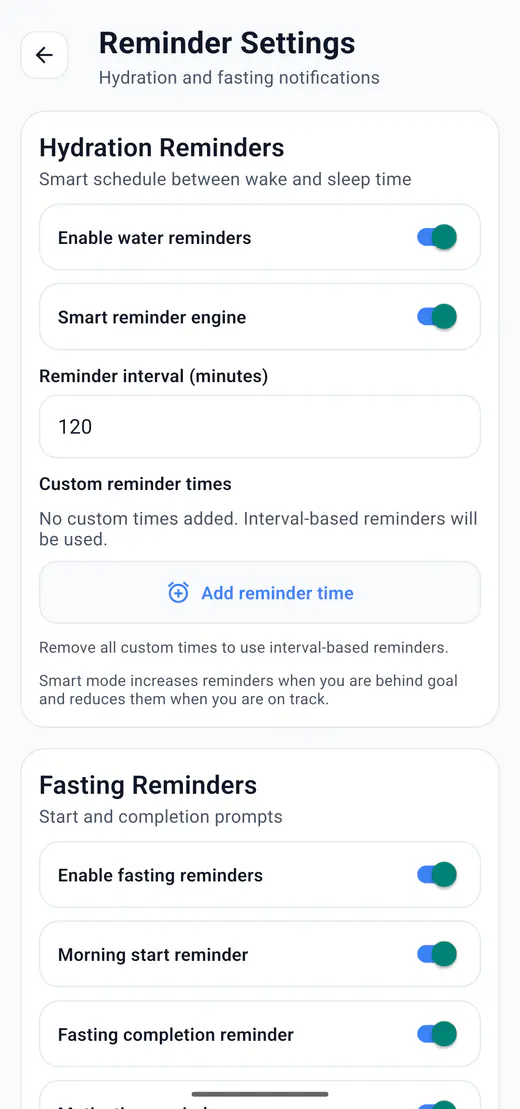
HydroFast hydration reminders are Android notifications that help users remember water intake through interval schedules, custom times, progress-aware behavior, and practical notification actions.
HydroFast works as a water reminder app for Android using notifications scheduled around the user's selected routine.
HydroFast uses Android notifications for reminder scheduling. This keeps daily reminders focused on the user's device and avoids requiring a remote push backend for hydration and fasting reminder delivery.
HydroFast configures an Android notification channel for reminder delivery.
HydroFast checks and requests notification permission where Android requires it.
Hydration and fasting reminders are scheduled locally on the device.
Scheduling controls help avoid duplicate or conflicting reminders.
Reminder handling includes scheduling collision controls and duplicate-processing safeguards for reliable daily behavior.
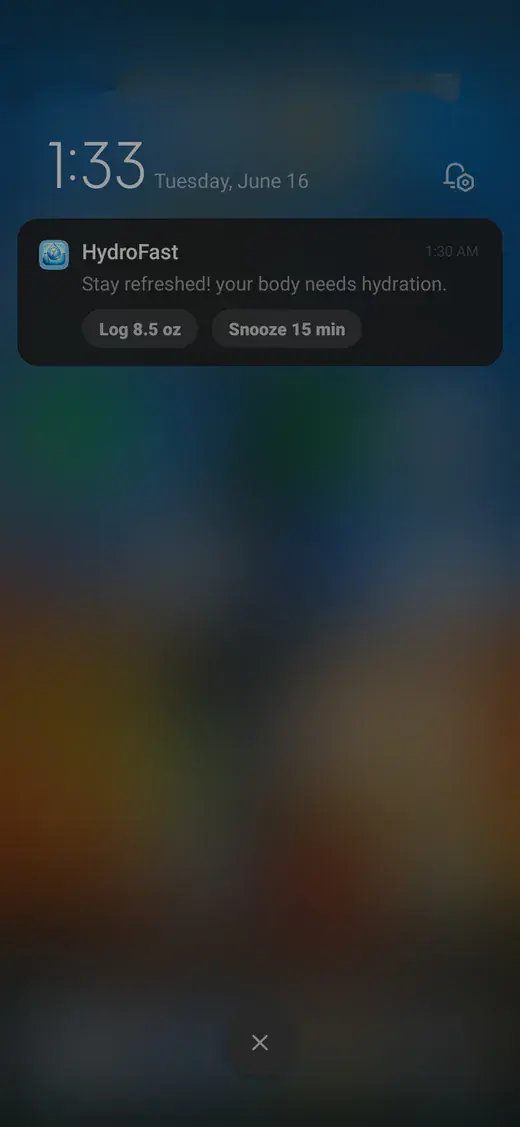
Hydration notification illustration with Log 8.5 oz and Snooze 15 min. Fasting notifications use Start Fast and End Fast instead.
HydroFast supports hydration reminders for users who want help remembering water intake during the day. Reminder settings can follow intervals, custom reminder time slots, and smart adaptive behavior.
Schedule water reminders at repeating intervals.
Keep reminder scheduling aligned with the user's daily routine.
Add specific reminder times using a custom HH:mm list.
Adjust reminder behavior based on hydration progress.
Receive a gentle reminder to return to your routine.
Use reminders to support consistent daily water logging.
The Morning start reminder uses your profile's wake time and requires a saved plan. The completion reminder follows the remaining time of an active session. There is no separate custom fasting-start alert time.
An optional prompt at your profile's wake time. It does not start a session automatically.
Get notified when a fasting session reaches completion.
Support fasting consistency with simple habit reminders.
Notification taps can route users toward fasting screens.
Notification tap handling can route to relevant app areas such as Water and Fast screens.
For schedule examples, notification controls, and troubleshooting, read the guide to using a fasting reminder app for Android.
Notification action buttons let you respond where the reminder appears. Log water, snooze, start a fast, or end a fast with fewer steps.
Android notification actions are handled through foreground listeners and background task registration for reliable response behavior.
Hydration notification illustration with Log 8.5 oz and Snooze 15 min. Fasting notifications use Start Fast and End Fast instead.
Start the day with water tracking and planned reminders.
Use hydration reminders and snooze when timing is not convenient.
Follow fasting start and completion reminders.
Log water or control fasting from Android notification actions.
HydroFast stores profile data, logs, sessions, settings, and reminder state on the device. That keeps everyday tracking straightforward on Android.
HydroFast is a wellness and habit tracking app. It does not provide medical advice, diagnosis, or treatment.
Hydration notification illustration with Log 8.5 oz and Snooze 15 min. Fasting notifications use Start Fast and End Fast instead.
Yes. Set a repeating interval or your own times, and reminders can adapt to how much you have already logged.
HydroFast uses Android notifications for reminders. The reminder system does not depend on a remote push notification backend.
Yes. Add specific times in HH:mm so prompts land around the day you already have.
The Morning start reminder uses your profile's wake time and requires a saved fasting plan. The completion reminder follows the remaining time of an active fast. Enable fasting reminders and the individual reminder switches, and allow Android notifications. There is no separate custom fasting-start reminder time picker.
HydroFast's Snooze 15 min action is for hydration reminders. Fasting notifications offer Start Fast and End Fast instead. Android may provide its own notification snooze control, depending on the device; that is separate from HydroFast's water-reminder action.
Yes. The Log water button records the amount straight from the notification.
Yes. Start Fast uses a saved fasting plan, and End Fast ends the current active or paused session. If no plan is saved, open HydroFast and choose one first. Receiving a notification does not itself start a fast; use an action or the app controls.
HydroFast checks and requests Android notification permission where required so local reminders can be delivered.
Android app
Interval or custom times, notification action buttons, and a snooze option, all scheduled on your own device.
Clear Android habit tracking
HydroFast focuses on practical water, fasting, reminder, and progress tools without medical claims.