
Quick answer
A good fasting tracker app for Android should include a live intermittent fasting timer, common plans such as 16:8 and OMAD, custom scheduling, start and end controls, pause and resume support, local reminders, session history, and progress analytics.
HydroFast is currently free on Android and combines fasting tracking with hydration tracking, reminders, charts, streaks, and Android quick actions.
1. A clear live fasting timer
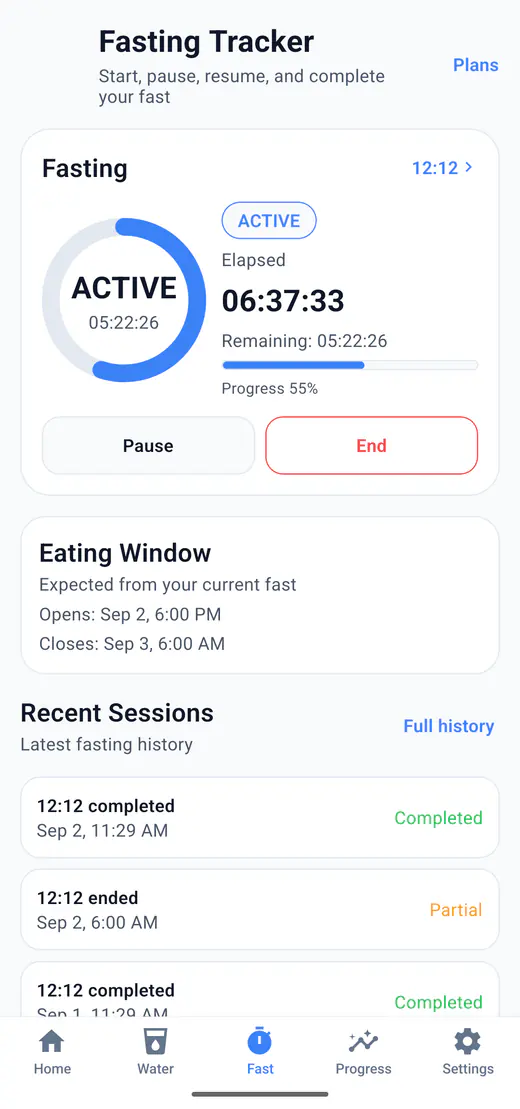
A useful fasting timer should make the current session easy to understand. Users should be able to see elapsed time, remaining time, current fasting status, completion state, and eating window information without digging through settings.
HydroFast shows elapsed and remaining fasting time and supports idle, active, paused, and completed session states.
2. Flexible fasting plans
A fasting tracker app should make it easy to select a plan that fits a user's chosen routine. The best plan selector is clear, neutral, and easy to change later.
12:12
A balanced 12-hour fasting window and 12-hour eating window.
14:10
A 14-hour fasting window and 10-hour eating window.
16:8
A common 16-hour fasting window and 8-hour eating window.
18:6
An 18-hour fasting window and 6-hour eating window.
20:4
A 20-hour fasting window and 4-hour eating window.
OMAD
A one-meal-a-day style tracking option.
Custom
A custom fasting and eating window selected by the user.
HydroFast checks custom plans so the fasting and eating windows add up to a full day.
3. Start, pause, resume, and end controls
Clear session controls matter because users need to understand what will happen when they start, pause, resume, or end a fast.
- Start a new fast
- Pause an active session
- Resume a paused session
- End and save the session
- Review completion status
HydroFast has all four, so a session can be adjusted without being abandoned.
4. Local fasting reminders on Android
Reminders can help users stay aware of fasting start and completion times. A fasting reminder app should make reminder timing clear and give users practical controls.
- Morning start reminder at your profile's wake time, with a saved plan
- Fasting completion reminder
- Motivation reminder
- Android local notifications
- Notification actions
HydroFast fasting notifications offer Start Fast and End Fast actions. The app's Snooze 15 min action belongs to hydration reminders, not fasting alerts.
5. Progress insights and session history
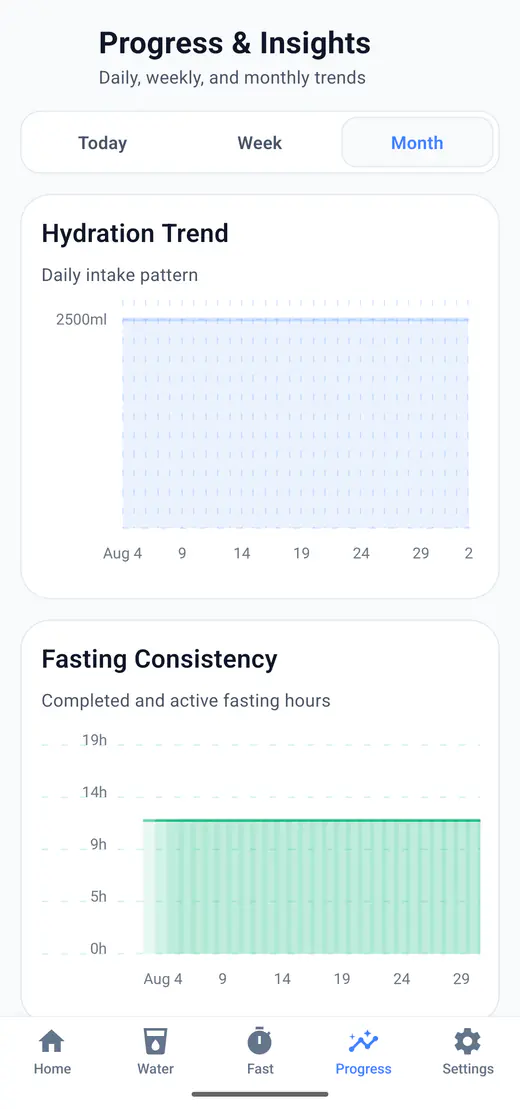
Progress views and history can make fasting tracking easier to review. Users should be able to see recent sessions, selected-period summaries, charts, and filters in one place.
- Today, Week, and Month views
- Fasting bar chart
- Total fasting hours
- Session history
- Fasting filters
- Streaks and achievements
6. Android widget and quick actions
An Android home screen widget can reduce tracking steps by keeping fasting status and common actions closer to the user.
HydroFast's Android widget can show fasting status and provide actions for starting or ending a fast.
Why combine fasting and hydration tracking?
Using one dashboard can make daily habit tracking easier because water logs, fasting status, reminders, charts, history, and motivation features are available in one place.
HydroFast combines fasting tracking, hydration tracking, reminders, progress insights, history, streaks, achievements, and Android quick actions in one app.
Hydration Tracker
Explore water logging, daily goals, ml/oz support, reminders, and history.
Features Overview
See HydroFast features for fasting, hydration, reminders, progress, and widget actions.
Fasting reminder app for Android
Learn about start alerts, completion alerts, notification actions, and troubleshooting.
Water fasting apps for Android
Compare combined timer, hydration, reminder, history, and progress features.
Choose an intermittent fasting schedule
Compare 12:12, 14:10, 16:8, 18:6, 20:4, and OMAD before deciding which plan to follow.
Fasting tracker app checklist
Live fasting timer
Multiple fasting plans
Custom plan support
Pause and resume
Start and completion reminders
Session history
Progress charts
Android widget
Clear wellness disclaimer
Fasting tracker app FAQ
What should a fasting tracker app for Android include?
A useful fasting tracker app for Android should include a live timer, flexible fasting plans, clear session controls, reminders, history, progress insights, and an easy-to-use interface.
Does HydroFast support 16:8 fasting?
Yes. 16:8 is one of the presets, along with 12:12, 14:10, 18:6, 20:4, OMAD, and a custom plan.
Can I pause and resume a fast in HydroFast?
Yes. All four controls are available: start, pause, resume, and end.
Does HydroFast have fasting reminders?
Yes, scheduled on the device for both the start and the end of a fast.
Can HydroFast show fasting progress?
Yes. During a fast you see elapsed and remaining time; afterwards the session joins your history, charts, and total hours.
Is HydroFast free?
HydroFast is currently free to use on Android.
Is HydroFast a medical fasting app?
No. HydroFast is a wellness and habit tracking app. It does not provide medical advice, diagnosis, treatment, or personalized fasting recommendations.
Wellness disclaimer
HydroFast is a wellness and habit-tracking app. It does not provide medical advice, diagnosis, treatment or medically supervised fasting plans. Fasting may not be suitable for everyone. Consult a qualified healthcare professional before making major changes to your diet, fasting routine, medication or health plan.