
Quick answer
Build a water drinking habit by attaching water to routines you already repeat, such as waking up, every meal, and every return to your desk, instead of waiting to feel thirsty. Keep logging to a single tap so the record survives busy days, treat reminders as a cue rather than a target, and count a missed day as one missed day instead of a reason to start over.
This guide is published by the developer of HydroFast, an Android water and fasting tracker. It covers habit design and app behavior. It is not medical or nutritional advice, and it does not tell you how much water to drink.
Why the water is the easy part
Drinking a glass of water takes a few seconds and costs nothing. That is worth stating plainly, because it rules out the explanation most people reach for first. Effort is not why the habit fails.
Three things have to line up for any small daily action to stick, and hydration is weak in two of them.
- The cue. Something has to tell you that now is the moment. Thirst is a weak cue for habit building because it competes for attention with whatever you are concentrating on, and busy stretches are exactly when it loses.
- The action. Drinking is trivial. Recording it is where friction creeps in: unlock the phone, find the app, pick an amount, confirm.
- The feedback. Nothing visible changes after one glass. With no record, there is no signal that the routine is working, so there is nothing to reinforce it.
A hydration habit that lasts is mostly a cue problem and a feedback problem. The rest of this guide works through both.
Anchor water to something you already do
Habits attach to events more reliably than to clock times. A 10:30 AM reminder assumes your 10:30 is predictable. “Whenever I sit back down at my desk” makes no such assumption.
Pick two or three anchors that happen on almost every day you have, including the bad ones:
- The first thing after you turn off your morning alarm
- With each meal, before you start eating
- Every time you refill coffee or tea
- When you sit down again after a meeting or a walk
- Right before you brush your teeth at night
Two anchors you keep beat six that only work on calm days. Add the third once the first two stop needing thought.
Anchors also decide what a realistic goal looks like. Three dependable anchors and a 250 ml glass produce 750 ml before you have made a single deliberate effort. Setting the goal from a routine you can keep works better than picking a round number and hoping the day cooperates.
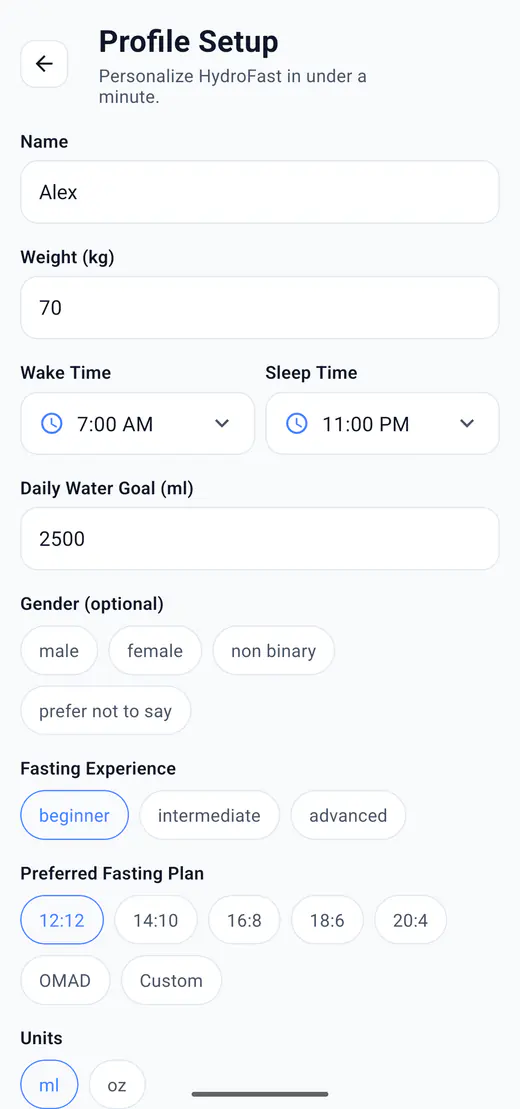
HydroFast asks for wake and sleep times during profile setup, alongside the daily goal and whether you prefer millilitres or ounces. Those hours keep reminder scheduling aligned with your routine rather than a fixed calendar day, which matters if you wake at 5 AM or work an evening shift. The daily water goal and intake logging page covers how the goal and progress ring behave once that is set.
Get logging under five seconds
If recording a glass takes longer than drinking it, the log is the first thing you drop. Once the log goes, so does the feedback that kept the habit visible, and the habit follows a week or two later. Reconstructing the day from memory at bedtime is the same failure in slower motion: the entries become guesses, which makes the history useless for the pattern review further down this page.
HydroFast keeps four preset amounts on the water screen: 100 ml, 200 ml, 250 ml, and 500 ml. Anything else goes in through Custom, and a saved entry can be edited or deleted if you tap the wrong number.
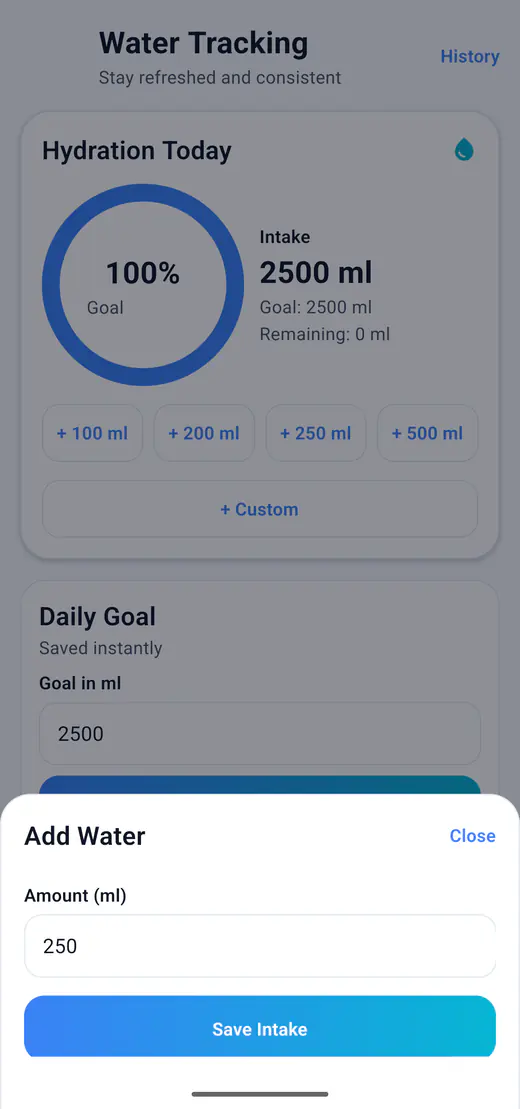
Two other surfaces remove the app-opening step entirely:
- The Log water button on a hydration reminder records the amount from the notification itself.
- The Android home screen widget has an add-water button, so a glass takes one tap next to your other icons.
The tap count matters less than when it matters: logging has to stay cheap on the day you are running late, because that is the day the habit is being tested.
Treat reminders as a cue, not a target
A reminder's job is to start the action, not to be the action. That distinction changes how you configure it.
Reminders that fire too often stop working, and not because you stop hearing them. You learn to dismiss them. Every swipe is practice at ignoring the thing, and after a few days the notification is just a shape you clear. Four or five prompts you act on are worth more than sixteen you never read.
HydroFast supports both scheduling styles, so you can match whichever describes your day. Interval reminders repeat at a set gap. Custom times let you list specific slots when you already know where the gaps are, such as mid-afternoon. Smart adaptive reminders adjust based on hydration progress, and Snooze 15 min pushes a prompt back when the timing is wrong without switching anything off. The hydration reminder settings page walks through each option.
Reminders also depend on Android letting them through. Notification permission, a disabled channel, battery restrictions, or manufacturer background limits can all stop an alert from appearing, and menu names differ between phones. Google's guide to controlling notifications on Android covers the system-level controls, and the reminder troubleshooting steps in the fasting reminder guide apply to hydration alerts as well.
How long does it take to build a water drinking habit?
There is no fixed number of days, and the widely repeated 21-day figure is not a reliable rule. How many inconvenient days you get through matters more than the calendar. A useful practical marker: you can go a full week without needing the reminder for at least one of your anchors. The morning one usually goes first.
The timeline also depends on how often the anchor occurs. An anchor tied to something that happens three times a day collects far more repetitions in a week than one tied to a twice-weekly gym session, so it settles sooner. If a routine still feels effortful after several weeks, the anchor is a more likely problem than your discipline. It probably does not happen as reliably as you assumed when you picked it.
Let the record do the motivating
Feedback is the half of the habit loop that hydration lacks by default, and supplying it is a tracker's real job. HydroFast keeps a hydration streak, a fasting streak, and a combined streak, and shows them on the Home dashboard so checking takes no navigation. Achievements mark the longer runs: First Sip for a first logged intake, 3-Day Hydration Hero for three consecutive days at your goal, 7-Day Fast Focus, and 30-Day Wellness Warrior for a month-long combined streak. They unlock automatically as the underlying logs qualify.
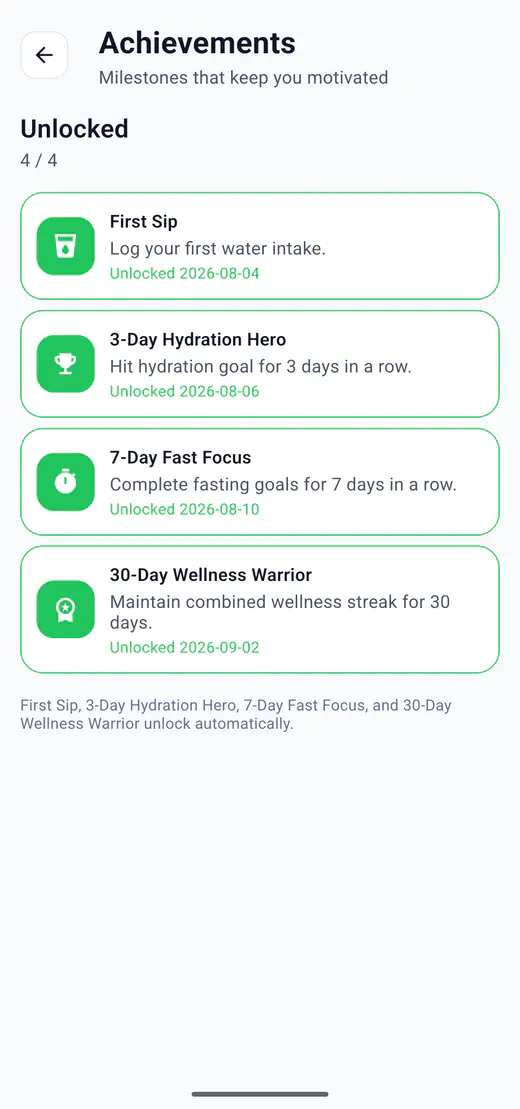
The app also shows a wellness score, a daily habit score derived from hydration and fasting activity. It exists for motivation and habit review rather than medical evaluation, and the same is true of the badges. The hydration streaks and achievement badges page explains how each one is derived from what you log.
One caution, because it undoes everything above: a streak is only useful while the log is honest. If you catch yourself adding water you did not drink to protect a number, the streak has stopped measuring the habit and started replacing it. Lower the goal instead.
What to do the day after you break a streak
Log the day honestly and keep your next anchor. One missed day is a missed day. Two in a row is how a routine ends, so the single most useful rule here is not to miss twice.
It helps to decide a floor in advance, the amount you will still reach on the worst day of the month, kept deliberately separate from your goal. If the goal is 2,500 ml, the floor might be the 750 ml your three anchors produce on their own. A floor day is not a failed day. It is the routine surviving without the goal, which is the only reason the routine is still there next week.
Resist back-filling. Editing and deleting entries exists for genuine corrections, such as a mis-tapped 500 ml that should have been 250 ml. Using it to invent a day you did not have makes your own history useless as a signal, and history is what the next section depends on.
Read your own pattern before you change the goal
The History screen groups water logs and fasting sessions by day, with All, Water, and Fasting filters to narrow the view. The timestamps are the useful part. Two days that both total 2,500 ml look identical in a summary and nothing alike in the log: five entries after 9 PM is a distribution problem, and raising the goal will not touch it.
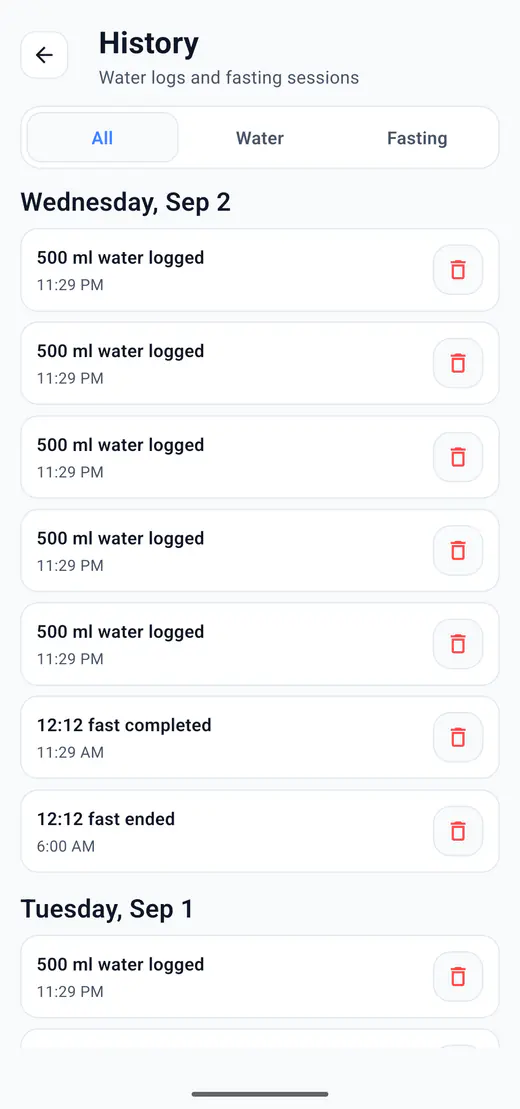
Three patterns are worth looking for, and each points at a different fix.
| What the log shows | What it usually means | What to change |
|---|---|---|
| Most entries after 8 PM | You are catching up at night instead of drinking through the day | Move or add a morning anchor; leave the goal alone |
| Weekdays consistent, weekends empty | Every anchor you chose is work-shaped | Add one anchor that also exists on a Saturday |
| Steady days, always short by a similar amount | The routine is stable but one anchor short | Add an anchor rather than enlarging the existing ones |
For longer stretches, the Today, Week, and Month progress views plot the same logs as a hydration line chart with average intake, which reads more clearly across a month than a timeline does. Give any change two full weeks before judging it. One week holds too few days to separate a real shift from an ordinary bad Wednesday.
Common hydration habit mistakes
- Starting at a goal you have never hit. Day one is the worst time to attempt your ceiling. Start from what your anchors already produce and raise it later.
- Changing two things at once. A new goal and new reminder times in the same week leave you unable to tell which one moved the result.
- Removing the cue as soon as it works. Reminders switched off the week a habit starts feeling automatic often take the habit with them a fortnight later.
- Building the routine around a device. If every anchor depends on having your phone in hand, the habit breaks the first time it is charging in another room.
A three-week way to start
Sequence matters more than the calendar here. Nothing about three weeks is special; the order is what stops you configuring reminders for a routine that does not exist yet.
Week 1: one anchor, logged
Pick the single anchor that happens no matter how the day goes, usually the morning one. Drink there, log it, and ignore the daily total for now.
Week 2: add a cue
Add a second anchor and turn on reminders for the part of the day you keep missing. Keep the count low enough that you act on every prompt.
Week 3: read the pattern
Open the week view and the history timeline. Adjust the anchors or the goal based on what the log shows, not on how the week felt.
If a week goes badly, repeat it instead of moving on. A reminder added to a habit that has not found its anchor yet is just another notification you dismiss.
Wellness note
HydroFast is a wellness and habit tracking app. It does not provide medical advice, diagnosis, or treatment, and it does not calculate how much water you should drink. Fluid needs differ with body size, activity, climate, health conditions, and medication, and both too little and too much fluid can matter. Talk to a qualified healthcare professional before setting or changing an intake target, particularly if you have a kidney, heart, or liver condition, are pregnant, or take medication that affects fluid balance.
Hydration habit FAQ
How do I build a habit of drinking more water?
Attach water to events you already repeat rather than to clock times, keep logging to one or two taps so the record survives busy days, and use reminders to start the action instead of treating them as the goal. Two anchors you keep are worth more than six that only work on calm days.
How long does it take for drinking water to become a habit?
There is no fixed number of days, and the widely repeated 21-day figure is not a reliable rule. Repetition on inconvenient days matters more than the calendar. A practical marker is going a full week without needing the reminder for at least one of your anchors.
Why do I keep forgetting to drink water?
Usually because the habit has no reliable cue. Thirst competes with whatever you are concentrating on, so it tends to lose during exactly the busy stretches when water gets skipped. Tying water to a repeating event, or to a notification, replaces a cue you might miss with one you will not.
Does tracking water intake help you drink more water?
Tracking mainly adds feedback. Drinking one glass changes nothing you can see, so without a record there is no signal that the routine is working. A log turns an invisible routine into something you can review, which is what makes patterns such as late-evening catch-up drinking noticeable.
How much water should I drink each day?
HydroFast does not set that number and this guide does not recommend one. Fluid needs vary with body size, activity, climate, health conditions, and medication, so it is a question for a qualified healthcare professional. In the app you enter the daily goal yourself and can change it at any time.
What should I do after breaking a hydration streak?
Log the day honestly and keep your next anchor. One missed day is a missed day; two in a row is how the routine ends. Deciding a floor amount in advance, separate from your goal, keeps the habit intact on days when the goal is out of reach.
Do hydration reminders on Android actually work?
They work when they arrive at a moment you can act on and when Android allows them through. Notification permission, disabled channels, battery restrictions, and manufacturer background limits all affect delivery, so a reminder that never appears is usually a settings problem rather than an app preference problem.
Build the cue, not the willpower
The habit that lasts is rarely the one with the most ambitious goal. It is the one with a cue that fires on a bad day and a record honest enough to be worth reading. Pick two anchors, keep logging cheap, and let the history tell you what to adjust next month.